Mastering Architectural Deadlines: Achieve High-Quality Renders Faster with SecondRender AI
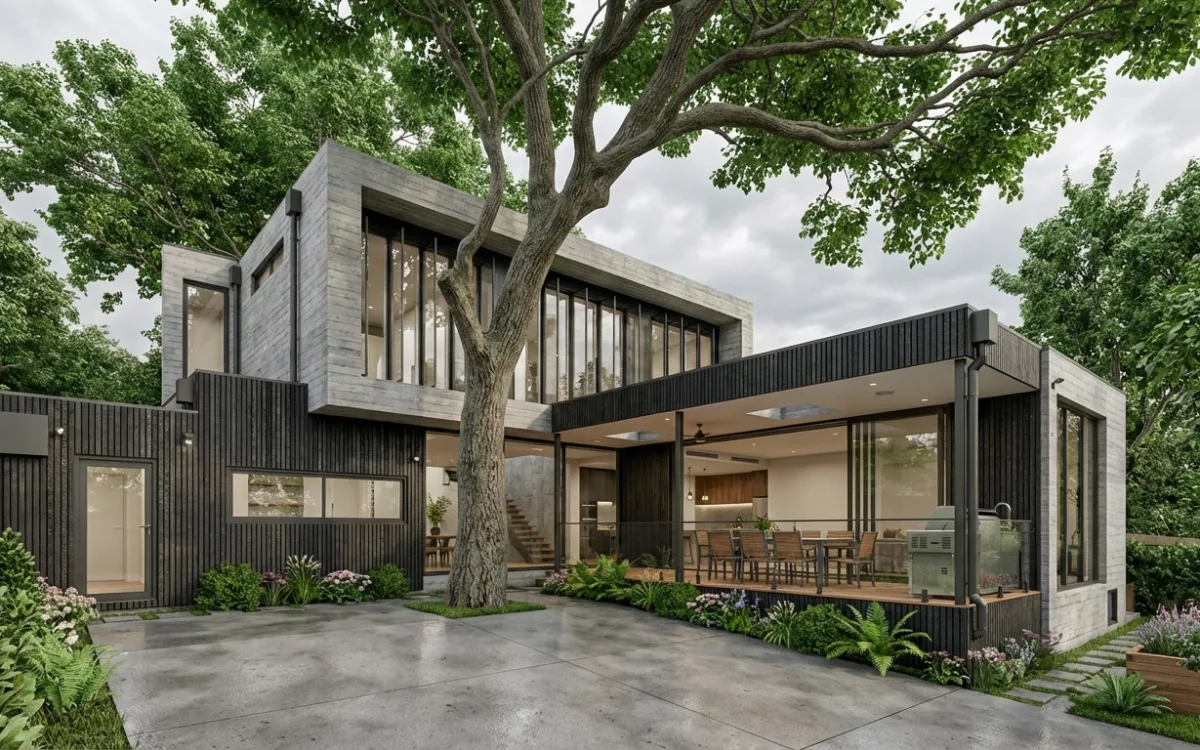
Introduction: The Relentless Pressure of Architectural Deadlines
Every architect knows the feeling: the relentless ticking clock, the looming deadline, and the unwavering demand for perfection. You're not just designing spaces; you're crafting visions, and those visions need to be presented in stunning, photorealistic detail. This constant battle to deliver impeccable visuals under tight deadlines is a defining challenge of the profession, often pushing creative boundaries to their limits while simultaneously testing an architect's endurance.
We understand the struggle – the long hours stretched into late nights, the stress of iterative adjustments, and the gnawing fear of not meeting client expectations or, worse, compromising your artistic integrity. The pursuit of photorealism, while essential for conveying design intent, has historically been a time-consuming and resource-intensive endeavor. But what if there was a way to achieve high-quality renders faster, without sacrificing your sanity or your vision? This article will explore how modern, AI-powered solutions are transforming this challenge into an opportunity, fundamentally reshaping the architectural visualization landscape.
The Architect's Deadline Dilemma: When Hours Aren't Enough
"I have a project due Monday and despite me putting in hours of work I still can’t complete some basic requirements." This lament is all too common in architectural studios worldwide, from boutique firms to large corporate practices. You pour your heart and soul into a design, meticulously crafting every detail, only to find that the visualization process itself becomes the biggest bottleneck, consuming disproportionate amounts of time and energy.
The real-world impact of missed deadlines extends far beyond a few extra hours at the office. It can lead to client dissatisfaction, damaging your firm's reputation and potentially jeopardizing future projects. Imagine losing a crucial bid because your competitor presented more compelling, high-fidelity visuals faster. Project delays cascade, impacting budgets and timelines for everyone involved – from contractors to developers. And on a personal level, it inevitably leads to burnout, stifling the very creativity that drew you to architecture in the first place. The paradox is cruel: clients demand both lightning speed in delivery and impeccable perfection in the final output, leaving architects in a constant state of tension. This pressure is particularly acute in competitive markets where visual communication is paramount to securing commissions and effectively conveying complex design narratives.
Traditional Rendering Bottlenecks: Where Time Disappears
To understand how to gain time and achieve faster architectural renders, we must first identify precisely where it's lost. The traditional rendering workflow is riddled with time-consuming stages, each presenting its own set of challenges and delays.
Manual Modeling and Texturing: The Foundation of Frustration
The initial stages of creating a 3D scene are incredibly labor-intensive.
- Intricate Detail Work: Architects spend painstaking hours on intricate details, from custom furniture and bespoke fixtures to complex material shaders. Every brick in a wall, every leaf on a tree, every reflection on a glass facade needs careful consideration and manual application. This isn't just about placing objects; it's about ensuring their scale, proportion, and material properties are accurate.
- Material Library Management: Building and managing a robust library of high-quality, PBR (Physically Based Rendering) materials is a project in itself. Creating realistic textures, bump maps, displacement maps, and specular maps for various surfaces – concrete, wood, metal, fabric – can consume days, if not weeks, of a project's timeline. The quest for photorealism often means meticulously crafting these elements from scratch or extensively modifying existing assets.
- Scene Assembly: Populating a scene with entourage – people, vehicles, landscaping elements – adds another layer of complexity. Each element needs to be correctly scaled, positioned, and lit to integrate seamlessly into the overall composition.
Protracted Render Times: The Waiting Game
Once your scene is meticulously set, the actual rendering process can become a frustrating waiting game.
- Computational Demands: High-resolution, photorealistic images demand significant computational power. Ray tracing and global illumination algorithms, essential for realistic lighting and shadows, are incredibly resource-intensive. This often ties up powerful workstations for hours or even days, rendering them unusable for other tasks.
- Iterative Adjustments: The creative process is rarely linear. Iterative adjustments – tweaking a light source, refining a material, adjusting camera angles, or experimenting with atmospheric effects – mean constant re-rendering cycles. Each minor change necessitates a new render, adding significantly to the clock and extending project timelines. This "render farm bottleneck" can halt progress and stifle creative exploration.
- Hardware Limitations: For many firms, investing in a dedicated render farm or high-end GPUs for every workstation is cost-prohibitive. This often means relying on less powerful machines, further exacerbating render times and limiting the complexity of scenes that can be efficiently processed.
Post-Production Woes: The Final Polish Puzzle
The raw render is rarely the final product. The time-consuming process of post-production is an art form in itself, requiring specialized skills and significant time investment.
- Photoshop Touch-ups: This includes everything from minor color correction and exposure adjustments to adding atmospheric effects like fog or haze, compositing elements (e.g., people, cars, sky replacements), and refining reflections or shadows.
- Color Grading and Mood Setting: Achieving the desired mood and aesthetic often involves extensive color grading, which can be subjective and require multiple iterations based on client feedback.
- Detail Enhancement: Adding subtle details like lens flares, depth of field effects, or sharpening specific areas can elevate a render, but each step adds to the overall time commitment.
The Revision Loop: A Cycle of Delays
Client feedback, while crucial for project success, can often send you back to square one, creating a challenging revision loop.
- Subjective Feedback: A simple request to "make the facade lighter" or "try a different material" can necessitate extensive re-rendering and post-production work, eating up precious time and pushing deadlines further. Interpreting subjective feedback and translating it into technical adjustments is a skill in itself.
- Scope Creep: Without clear boundaries, revisions can lead to scope creep, where minor changes snowball into significant rework, impacting both budget and timeline.
- Communication Gaps: Misunderstandings between architects and clients regarding visual expectations can lead to multiple rounds of revisions, each requiring significant time investment in rendering and post-production.
Smart Strategies for Efficient Rendering (Beyond AI)
While technology offers revolutionary solutions, foundational best practices remain invaluable for any architect aiming for efficiency. Integrating these strategies into your workflow, even before considering AI, can significantly streamline your visualization process.
Proactive Project Planning and Communication
- Set Realistic Timelines: From the outset, establish clear, realistic timelines for the rendering process. Communicate these timelines to clients, managing their expectations about the number of views, level of detail, and resolution required. A detailed scope of work for visualization can prevent last-minute scrambles.
- Define Deliverables Early: Clearly define the number of final images, their resolution, and the specific camera angles or perspectives needed. Agree on key milestones for feedback and approvals to minimize late-stage changes.
- Client Education: Educate clients on the rendering process, explaining the time and effort involved. This transparency can foster understanding and reduce unreasonable demands.
Prioritization Techniques and Iterative Workflows
- Focus on Key Views: Not every view needs to be a masterpiece. Identify and prioritize the most impactful views and critical elements first, ensuring these are perfected before diving into secondary perspectives or less impactful details.
- Progressive Refinement: Instead of aiming for a perfect final render from the start, adopt a progressive refinement approach. Start with quick, lower-quality renders for initial feedback on composition and lighting, then gradually increase detail and quality as the design solidifies.
- Batch Rendering: For multiple views or animations, utilize batch rendering capabilities in your software to process images overnight or during off-peak hours, maximizing workstation uptime.
Optimizing 3D Models and Scene Management
- Clean Geometry: Maintain clean, efficient geometry. Remove unnecessary polygons, especially for objects that won't be seen up close. Use quad-based topology where possible for smoother deformations and easier editing.
- Efficient Polygon Counts: Be mindful of polygon counts. While detail is important, excessive polygons can drastically increase render times. Use techniques like normal maps or displacement maps to add detail without increasing geometric complexity.
- Well-Organized Scene Files: Keep your scene files organized with logical naming conventions for objects, layers, and materials. Group related objects and purge unused elements regularly. This makes navigation, editing, and troubleshooting much faster.
- Instances for Repetitive Items: For repetitive elements like trees, chairs, or railings, use instances instead of unique copies. Instances share the same mesh data, significantly reducing file size and memory usage, which in turn speeds up rendering.
Leveraging Asset Libraries and Smart Resources
- Pre-made, High-Quality Assets: Don't reinvent the wheel. Utilizing pre-made, high-quality models, materials, and textures from reputable asset libraries (e.g., Evermotion, Quixel Megascans, Chaos Cosmos) can save countless hours of modeling and texturing work. This allows you to focus on unique design elements and creative problem-solving.
- Optimized Materials: Use optimized PBR materials that are designed for efficiency without sacrificing realism. Understand how different material properties (e.g., reflectivity, transparency, subsurface scattering) impact render times.
- Proxy Objects: For complex models or large environments, use proxy objects. These are lightweight representations of detailed models that are only fully loaded at render time, improving viewport performance and reducing memory consumption during scene setup.
The Game-Changer: How AI is Revolutionizing Architectural Visualization
Across industries, Artificial Intelligence is proving to be a transformative force, automating repetitive tasks, enhancing data analysis, and unlocking new creative possibilities. In the realm of design and visualization, AI's impact is particularly profound, offering solutions to long-standing challenges that have plagued architects for decades.
AI isn't just a buzzword; it's a powerful tool that can automate the mundane, enhance realism with intelligent algorithms, and dramatically accelerate creative processes. For architects, this means shifting from manual labor to intelligent assistance. Instead of spending hours meticulously tweaking render settings or painstakingly crafting textures, AI can handle these complex calculations with unprecedented speed and accuracy. AI isn't about replacing the architect's vision or skill; it's about empowering them, freeing up valuable time to focus on core design challenges, conceptual exploration, and client engagement, rather than getting bogged down in technical rendering complexities. It enables a paradigm shift, allowing architects to visualize ideas almost as quickly as they conceive them.
Understanding AI in Visualization: Beyond the Hype
At its core, AI in visualization leverages machine learning algorithms, particularly deep learning and neural networks, trained on vast datasets of images and 3D models. These networks learn the intricate relationships between geometry, materials, lighting, and photorealistic output.
- Generative AI: This branch of AI can generate new content, such as textures, environmental elements, or even entire scene compositions, based on learned patterns and user input.
- Image Synthesis: AI models can synthesize photorealistic images from simpler inputs (like sketches or basic 3D models) by "filling in" the details, lighting, and material properties that would traditionally require extensive manual work.
- Intelligent Optimization: AI can analyze a scene and intelligently optimize render settings, light bounces, and material properties to achieve the best visual quality in the shortest possible time, often surpassing what a human could achieve manually.
This intelligent automation means that tasks that once required expert knowledge and significant time investment can now be performed with remarkable speed and consistency, democratizing access to high-quality visualization.
SecondRender: Your Partner for Faster Architectural Renders and Uncompromised Quality
This is where SecondRender steps in, offering a revolutionary approach to architectural visualization. Our platform harnesses the power of advanced AI to deliver photorealistic renders from your sketches and 3D models, fundamentally changing how you approach deadlines and quality. We bridge the gap between your creative vision and its stunning visual representation, making faster architectural renders a consistent reality.
From Concept to Photorealism: SecondRender's Streamlined Workflow
SecondRender is designed to integrate seamlessly into your existing design process, transforming conceptual designs into breathtaking visuals with unparalleled speed and ease.
- Input Your Design: Whether you start with a simple hand sketch, a detailed CAD drawing, or a fully modeled 3D scene from software like SketchUp, Revit, Rhino, or Blender, SecondRender accepts a variety of inputs.
- AI-Powered Interpretation: Our intelligent algorithms analyze your input, understanding the spatial relationships, material indications, and lighting cues. For sketches, it interprets lines and forms; for 3D models, it processes geometry and basic material assignments.
- Rapid Visualization: With a few clicks, SecondRender's AI takes over, applying sophisticated lighting models, realistic material textures, and environmental effects. It intelligently fills in details, adds entourage, and refines reflections and shadows to create a photorealistic image.
- Iterate and Refine: The platform allows for quick adjustments. Want to try a different time of day? Change a facade material? Experiment with landscaping? SecondRender generates new options in moments, facilitating rapid iteration and exploration.
Key Advantages of SecondRender:
- Rapid Iteration: Imagine generating multiple design options, material studies, or perspective views in minutes, not days. SecondRender's AI allows for lightning-fast iterations, enabling you to explore more creative avenues and present a wider range of concepts to your clients with unprecedented speed. This agility is crucial for refining designs and responding to feedback efficiently.
- Drastically Reduced Render Times: Say goodbye to hours of waiting. SecondRender leverages advanced AI algorithms to cut down processing time from hours to mere seconds. This means you can get high-quality outputs almost instantly, allowing for real-time adjustments and immediate feedback. This is key to achieving truly faster architectural renders without compromising on visual fidelity.
- Enhanced Realism & Detail: Our AI intelligently handles the complex nuances of lighting, textures, reflections, and environmental details. It understands how light interacts with materials, how shadows fall, and how atmospheric effects contribute to realism, ensuring your output is consistently high-quality and visually stunning, without extensive manual tweaking. The AI's deep learning capabilities mean it can produce results that often rival, or even surpass, manually optimized renders in terms of visual richness and authenticity.
- Streamlined Workflow: SecondRender transforms your conceptual designs into breathtaking visuals with unparalleled speed and ease. Whether you start with a simple sketch or a detailed 3D model, our platform integrates seamlessly into your workflow, helping you meet even the tightest deadlines with confidence and deliver faster architectural renders that impress. It minimizes the technical burden, allowing architects to focus on design rather than rendering mechanics.
Real-World Scenarios: How SecondRender Delivers
Consider these practical applications:
- Early-Stage Concept Development: Quickly visualize multiple massing options or facade treatments from simple sketches, allowing for rapid internal review and client buy-in before significant modeling effort.
- Material Studies: Present clients with various material palettes for a building's exterior or interior in minutes, helping them make informed decisions without lengthy rendering cycles for each option.
- Client Presentations: Generate high-quality visuals for last-minute client meetings, ensuring you always have compelling imagery to support your design narrative.
- Competitive Bidding: Produce superior, more numerous visuals for project bids, giving your firm a distinct advantage in a crowded market.
Beyond Speed: Unleashing Creative Freedom and Client Satisfaction
While speed is a critical advantage, the benefits of integrating AI into your rendering process with SecondRender extend far beyond simply beating the clock. It fundamentally shifts the paradigm of architectural practice, fostering greater creativity and deeper client engagement.
Reclaim Your Time and Enhance Work-Life Balance
By automating the most time-consuming aspects of rendering, you gain back precious hours. This reclaimed time can be reinvested into deeper design exploration, more thorough client communication, professional development, or simply achieving a healthier work-life balance. Imagine leaving the office on time, knowing your renders are being generated efficiently, rather than waiting for a machine to finish. This reduction in stress can reignite passion and prevent burnout.
Present More Options and Foster Deeper Engagement
With the ability to generate renders so quickly, you can afford to present clients with a wider range of high-fidelity visuals. Show them multiple material palettes, lighting scenarios (e.g., day, dusk, night), landscaping options, or even different architectural styles. This not only gives them a more comprehensive understanding of your vision but also empowers them to participate more actively in the design process, leading to greater satisfaction and ownership.
Improved Client Communication and Faster Feedback Loops
Facilitate faster feedback loops with quick, realistic renders. Clients can see changes almost instantly, leading to more productive discussions and fewer misunderstandings. Instead of waiting days for a revised render, a client can provide feedback on a new material choice and see the updated visual within minutes. This iterative, real-time communication ensures everyone is on the same page, minimizing costly revisions down the line and building stronger client relationships.
Gain a Competitive Edge and Win More Projects
In a fast-paced industry, delivering projects faster and with higher visual impact is a significant differentiator. SecondRender empowers you to stand out, consistently exceeding client expectations and securing more projects. Firms that can consistently deliver stunning visuals quickly are perceived as more efficient, innovative, and client-focused. This competitive advantage translates directly into business growth and a stronger market position.
Fostering Innovation and Design Experimentation
When the technical burden of visualization is lifted, architects are free to experiment more boldly with design concepts. The ability to quickly visualize unconventional forms, complex geometries, or innovative material applications encourages greater creative risk-taking. SecondRender allows architects to test out ideas that might have been too time-consuming or expensive to render traditionally, pushing the boundaries of design and fostering true innovation.
Conclusion: Reclaim Your Time, Elevate Your Work
The pressure of architectural deadlines is an undeniable reality, often forcing architects to choose between speed and quality. However, with the advent of AI-powered visualization platforms like SecondRender, this compromise is no longer necessary. The era of waiting hours for a single render is rapidly fading, replaced by intelligent automation that empowers architects.
We've explored how traditional bottlenecks consume valuable time and how smart foundational strategies can help. But the true revolution lies in AI's ability to fundamentally transform the rendering process, offering unprecedented speed, realism, and efficiency. SecondRender offers a powerful solution, enabling you to consistently meet deadlines while delivering exceptional, high-quality renders. It's about less stress, more creativity, and unparalleled efficiency. The future of architectural visualization is here, empowering you to reclaim your time and elevate your work to new heights, ensuring your visions are always presented with the impact they deserve.
Ready to Beat the Clock?
Don't let deadlines dictate your creativity or compromise the quality of your architectural visualizations. Discover how SecondRender can transform your rendering workflow, helping you achieve stunning, faster architectural renders without the traditional headaches.
Sign in to get started with SecondRender today and unlock a new era of architectural visualization!