Elevate Your SketchUp Workflow: Stunning AI Renders with SecondRender
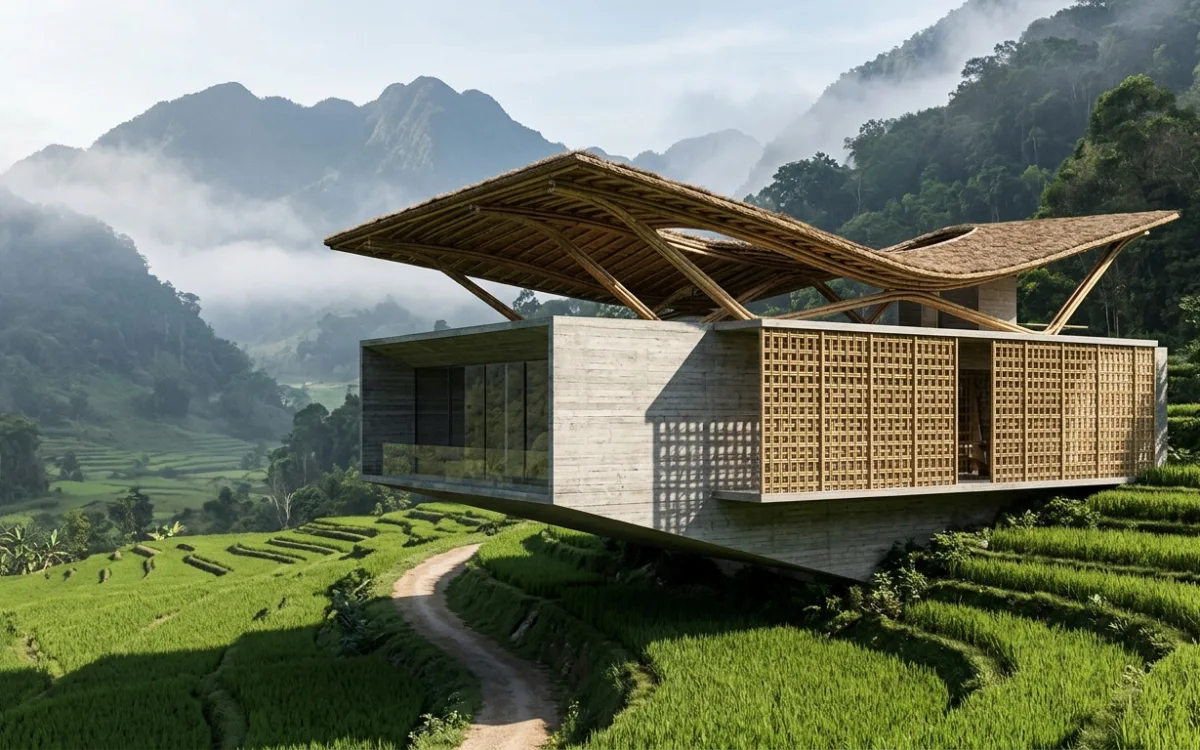
Introduction: The Quest for Photorealism in SketchUp
For decades, SketchUp has stood as a cornerstone in the architectural design world. Its intuitive interface, rapid modeling capabilities, and vast library of components have made it an indispensable tool for architects, designers, and students alike. From initial conceptual sketches to detailed 3D models, SketchUp empowers users to bring their ideas to life with remarkable speed and flexibility. However, the journey from a quick 3D model to a client-ready, photorealistic render has historically presented a significant hurdle. While SketchUp excels at modeling, its native rendering capabilities are often insufficient for the high-fidelity visuals demanded by today's competitive design landscape.
Architects constantly strive to present their visions in the most compelling way possible. This often means bridging the gap between quick 3D models and client-ready, photorealistic renders, especially within the Sketchup workflow rendering context. Traditional rendering solutions, such as V-Ray, Enscape, Lumion, or D5 Render, have long been the go-to for achieving this level of realism. These powerful tools offer sophisticated controls over lighting, materials, textures, and environments, capable of producing breathtaking images. Yet, they come with their own set of challenges: steep learning curves, significant time investments in setup and rendering, and often, a disruption to the creative flow as designers switch between applications and grapple with complex parameters.
The architectural industry is perpetually seeking ways to enhance efficiency without compromising quality. This pursuit has led us to a pivotal moment: the dawn of AI in architectural visualization. Artificial intelligence is rapidly ushering in a new era, promising to streamline the rendering process, democratize access to photorealism, and empower architects to focus more on design and less on the technical intricacies of rendering. This article will explore how AI, particularly through platforms like SecondRender, is poised to revolutionize your SketchUp workflow, transforming your designs into stunning visuals with unprecedented ease and speed.
The SketchUp Advantage & Its Rendering Roadblocks
SketchUp's enduring popularity among architects is no accident. Its strengths are perfectly aligned with the fast-paced, iterative nature of architectural design.
Why architects choose SketchUp:
- Speed and Ease of Use: SketchUp's push-pull modeling paradigm allows for incredibly rapid conceptualization and massing studies. Designers can quickly block out ideas, test forms, and iterate on layouts without getting bogged down in complex commands.
- Intuitive Interface: The software's user-friendly interface means a relatively short learning curve, enabling new users to become productive quickly. This accessibility makes it a favorite for students and seasoned professionals alike.
- Vast Component Library (3D Warehouse): The extensive 3D Warehouse offers a treasure trove of pre-made models, from furniture and fixtures to trees and vehicles. This significantly accelerates the detailing process, allowing architects to populate their scenes with realistic context without modeling everything from scratch.
- Conceptual Design Prowess: SketchUp shines in the early stages of design, facilitating quick exploration of spatial relationships, volumetric studies, and initial design iterations. It's an excellent tool for communicating core ideas before diving into intricate details.
The inherent limitations for photorealism:
Despite its many advantages, SketchUp's core strength lies in 3D modeling, not in advanced rendering. While it can display basic shadows and textures, achieving true photorealism—where images are indistinguishable from photographs—requires a more sophisticated rendering engine. The native Sketchup workflow rendering process lacks the advanced algorithms for global illumination, physically based materials, and complex light interactions that are essential for realistic visuals.
The "rendering gap":
This creates a "rendering gap" – the chasm between a well-modeled SketchUp scene and a high-quality, client-ready render. To bridge this gap, architects have traditionally relied on external rendering software. These applications are designed to simulate how light interacts with surfaces in the real world, producing nuanced shadows, reflections, refractions, and accurate material properties.
Common pain points with traditional renderers:
While powerful, traditional renderers introduce several pain points into the architectural workflow:
- Steep Learning Curves and Specialized Knowledge: Mastering a traditional renderer like V-Ray or Corona requires a significant investment of time and effort. Users need to understand complex concepts like GI engines, material nodes, light types, render settings, and post-production techniques. This often means dedicating valuable design time to learning and troubleshooting rendering software.
- Time-Consuming Setup: Even for experienced users, setting up a scene for rendering can be a laborious process. This involves meticulously adjusting materials, placing and configuring lights, defining camera angles, and fine-tuning render parameters to achieve the desired look. Each element requires careful attention, adding hours to a project.
- Interruptions to the Creative Flow: The need to export models, switch between applications, and navigate different interfaces can disrupt an architect's creative momentum. The iterative design process, which thrives on quick feedback, is often hampered by these technical hurdles.
- Iteration Speed Hampered by Long Render Times: High-quality renders, especially at high resolutions, can take hours, or even days, to complete. This significantly slows down the design iteration process, making it difficult to quickly test different material palettes, lighting scenarios, or design variations. Architects often have to choose between speed and quality, a compromise that can impact both project timelines and design exploration.
These challenges highlight a clear need for a more efficient, integrated, and accessible solution for Sketchup workflow rendering.
The Dawn of AI in Architectural Visualization
The landscape of design and technology is undergoing a profound transformation, largely driven by advancements in Artificial Intelligence. From generative design tools that explore countless permutations to intelligent assistants that automate mundane tasks, AI is reshaping how industries operate. Architectural visualization is no exception, standing on the cusp of a revolution powered by intelligent algorithms.
At its core, AI in design aims to augment human creativity and efficiency. It's about empowering designers with tools that can understand context, learn from data, and execute complex tasks with speed and precision that far exceed manual capabilities. In the realm of architectural visualization, this translates into a paradigm shift from labor-intensive, parameter-driven rendering to an intelligent, context-aware process.
The specific application of AI in rendering:
AI's application in rendering is multifaceted and incredibly powerful:
- Automating Complex Tasks: AI can take over the tedious and time-consuming aspects of rendering, such as material assignment, lighting setup, and environmental context generation. Instead of manually tweaking every parameter, designers can leverage AI to intelligently interpret their scene and apply realistic settings.
- Enhancing Visual Quality: AI algorithms can analyze vast datasets of real-world images and architectural renders to learn what constitutes "photorealistic." This knowledge allows AI to generate more accurate lighting simulations, nuanced material textures, and sophisticated atmospheric effects, often surpassing what can be achieved with traditional methods in a fraction of the time.
- Accelerating Workflows: By automating and optimizing key rendering processes, AI drastically reduces the time required to produce high-quality visuals. This acceleration enables faster iterations, quicker client feedback, and ultimately, more time for architects to focus on the core design challenges.
- Style Transfer and Generation: Beyond realism, AI can also be used for style transfer, transforming a basic render into a specific artistic style, or even generating entirely new design elements based on user input and learned patterns.
Moving beyond manual adjustments to intelligent, context-aware rendering:
Traditional rendering often feels like operating a complex machine, requiring precise inputs for every desired output. AI, however, introduces a layer of intelligence. Instead of telling the software exactly how to light a scene (e.g., "place a rectangular light here with these dimensions and this intensity"), you can tell it what kind of scene you want (e.g., "a bright, sunny afternoon with soft shadows") and let the AI interpret and execute the necessary parameters. This context-awareness allows the AI to make intelligent decisions about material reflections, ambient occlusion, volumetric effects, and even the placement of entourage, all based on the overall desired aesthetic and the geometry of your SketchUp model.
This shift is particularly impactful for SketchUp users, who are accustomed to a fluid, intuitive design process. The promise of AI is to extend that fluidity into the rendering phase, directly addressing the rendering roadblocks faced by architects. By integrating AI into the Sketchup workflow rendering, designers can finally achieve photorealistic results without the steep learning curves, time-consuming setups, and workflow interruptions that have long plagued the industry.
SecondRender: Seamless AI Integration for Your SketchUp Workflow
The challenges of traditional rendering, particularly for SketchUp users, have long been a bottleneck in the architectural design process. This is precisely where SecondRender steps in, offering a revolutionary solution powered by artificial intelligence.
Introducing SecondRender:
SecondRender is an AI-powered architectural visualization platform meticulously designed to transform your SketchUp models into stunning photorealistic renders with unparalleled ease and speed. It's not just another rendering engine; it's an intelligent assistant that understands the nuances of architectural design and the specific needs of architects. Our platform leverages cutting-edge AI algorithms to interpret your 3D models, apply realistic materials, simulate complex lighting conditions, and generate high-quality images that truly bring your designs to life.
The core promise:
SecondRender's core promise is simple yet profound: to bridge the gap between your SketchUp design and a high-quality visual with unprecedented ease and speed, fundamentally transforming your Sketchup workflow rendering. We eliminate the need for architects to become rendering experts, allowing them to focus on what they do best – designing innovative spaces. The platform takes your raw SketchUp model and, through intelligent AI processing, elevates it to a professional-grade visualization, making photorealism accessible to everyone.
How SecondRender enhances your existing workflow:
SecondRender is engineered to integrate seamlessly into your existing design process, enhancing rather than disrupting it:
- Eliminates the Need for Extensive Manual Rendering Setup: Forget spending hours tweaking material properties, placing dozens of lights, or fine-tuning complex render settings. SecondRender's AI intelligently analyzes your SketchUp model and automatically applies realistic materials, sets up appropriate lighting scenarios, and optimizes camera angles. This automation drastically cuts down setup time, allowing you to generate renders in minutes, not hours.
- Leverages AI to Interpret Your SketchUp Model: Our AI doesn't just apply generic settings; it intelligently interprets the context of your SketchUp model. It understands the difference between a wall, a floor, a window, or a piece of furniture, and applies physically accurate materials and textures accordingly. It can even suggest environmental contexts, such as urban settings or natural landscapes, to complement your design.
- Designed for Architects, by Understanding Architectural Visualization Needs: SecondRender was developed with a deep understanding of the architectural design process. We know that architects need speed for iterations, quality for presentations, and simplicity to maintain focus on design. Our interface and features are tailored to these specific requirements, ensuring that the tool is intuitive and directly addresses the pain points of architectural visualization.
Key differentiators:
SecondRender stands apart from traditional rendering solutions and even other AI tools through its unique combination of:
- Speed: Generate high-quality renders in a fraction of the time compared to traditional methods. Our AI processes complex scenes rapidly, enabling quick iterations and faster project delivery.
- Simplicity: An intuitive, user-friendly interface means minimal learning curve. Architects can start producing stunning renders almost immediately, without specialized training.
- AI-Driven Quality: Our advanced AI algorithms ensure that every render is not just fast, but also of exceptional photorealistic quality, accurately representing your design intent with realistic lighting, materials, and environmental context.
By integrating SecondRender into your Sketchup workflow rendering, you're not just adopting a new tool; you're embracing a smarter, faster, and more efficient way to visualize your architectural designs.
Elevating Your Renders: Key Benefits of SecondRender Integration
Integrating SecondRender into your architectural practice isn't just about adding another tool; it's about fundamentally transforming your Sketchup workflow rendering process and unlocking a new level of efficiency and quality. The benefits are tangible and directly address the pain points architects face with traditional rendering methods.
Unmatched Speed & Efficiency:
Time is a precious commodity in architectural design. SecondRender is engineered to give you more of it.
- Drastically Reduced Render Times: Say goodbye to overnight renders or hours spent waiting for a single image. SecondRender's AI processes your SketchUp models with incredible speed, often generating high-quality renders in minutes. This acceleration means you can produce multiple views, test different design options, and explore various material palettes in the time it would take to set up a single traditional render.
- Enabling Rapid Iterations and Design Exploration: The ability to quickly visualize changes empowers a more fluid and iterative design process. Architects can make adjustments in SketchUp, send the model to SecondRender, and see the photorealistic result almost instantly. This rapid feedback loop fosters creativity and allows for more thorough design exploration, leading to better design outcomes.
- Quicker Turnaround for Client Presentations and Feedback Cycles: Client communication is paramount. With SecondRender, you can generate stunning visuals for presentations much faster, allowing for more frequent updates and quicker feedback cycles. This not only impresses clients with professional-grade imagery but also streamlines the approval process, keeping projects on schedule.
Simplified Workflow, Professional Results:
One of SecondRender's most significant advantages is its ability to democratize photorealism.
- Intuitive Interface, Minimal Learning Curve: Unlike traditional renderers that demand extensive training, SecondRender boasts an intuitive, user-friendly interface. Architects can upload their SketchUp models and begin generating renders with minimal instruction, significantly reducing the barrier to entry for high-quality visualization.
- Focus on Design, Not on Complex Rendering Parameters: SecondRender frees architects from the technical complexities of rendering. Instead of grappling with GI settings, material nodes, or light intensities, you can focus your energy on the core design challenges. The AI handles the intricate details, allowing your creative vision to take center stage.
- Seamless Integration: The platform is designed to fit naturally into your existing SketchUp workflow, making the transition from modeling to rendering smooth and effortless.
Photorealistic Quality, Every Time:
The ultimate goal of rendering is to create images that accurately and compellingly represent your design intent.
- AI-Driven Material Application, Lighting Simulation, and Environmental Context: SecondRender's advanced AI analyzes your SketchUp model and intelligently applies physically accurate materials, simulates realistic lighting conditions (e.g., natural daylight, artificial interior lighting), and even suggests appropriate environmental contexts. This ensures that your renders are not just pretty, but also technically sound and visually convincing.
- Achieving Stunning Visuals that Truly Represent Your Design Intent: The AI's ability to interpret and enhance your model means that the final renders will faithfully communicate the atmosphere, textures, and spatial qualities of your design. This level of visual fidelity is crucial for conveying complex architectural ideas to clients and stakeholders.
Consistency & Control:
While AI automates much of the process, SecondRender ensures you remain in control of your creative vision.
- Maintain the Integrity of Your SketchUp Model: SecondRender works with your existing SketchUp model, respecting its geometry and basic material assignments. The AI enhances, rather than replaces, your design.
- AI Acts as an Intelligent Assistant, Not a Replacement for Your Creative Vision: You guide the AI, selecting styles, moods, and refining suggestions. SecondRender empowers you to achieve your vision more efficiently, acting as a powerful tool in your creative arsenal.
By harnessing these benefits, architects can elevate their presentations, accelerate their design process, and ultimately, deliver more impactful and compelling architectural experiences.
A Practical Guide: Integrating SecondRender into Your SketchUp Project
Integrating SecondRender into your Sketchup workflow rendering is designed to be straightforward and intuitive, minimizing friction and maximizing efficiency. This practical guide will walk you through the simple steps to transform your SketchUp models into stunning AI-powered renders.
Preparing Your SketchUp Model:
The quality of your render often starts with the quality of your model. While SecondRender's AI is powerful, a well-prepared SketchUp model will always yield the best results.
- Best Practices for Clean Geometry and Organized Layers:
- Clean Geometry: Aim for clean, manifold geometry. Avoid overlapping faces, stray edges, or excessively complex curves where simpler forms would suffice. Use SketchUp's "Fix Problems" or "Purge Unused" features regularly.
- Group and Component Usage: Make extensive use of groups and components. This keeps your model organized, makes it easier to select and modify elements, and helps SecondRender's AI interpret different objects within your scene. For instance, group all elements of a window, a wall, or a piece of furniture.
- Orient Faces Correctly: Ensure all faces are oriented with their front side (usually light blue/white) facing outwards. Incorrect face orientation can lead to rendering artifacts.
- Organized Layers (Tags in newer SketchUp): Use layers (now called Tags in SketchUp 2020+) to categorize elements (e.g., "Walls," "Floors," "Roof," "Furniture," "Landscape"). This not only helps you manage your model but can also aid SecondRender in understanding the different components of your scene.
- Simple Material Application within SketchUp for AI Interpretation:
- You don't need to apply highly detailed, PBR materials in SketchUp. Simple, distinct colors or basic textures are sufficient. SecondRender's AI will interpret these basic materials and intelligently apply photorealistic textures and properties. For example, assign a generic "wood" texture to all wooden elements, a "concrete" texture to concrete surfaces, and so on. The AI will then enhance these with realistic details.
- Ensure materials are applied to faces, not just groups or components, for accurate interpretation.
Exporting from SketchUp:
Once your model is clean and organized, exporting it for SecondRender is a simple process.
- Recommended Export Settings for Optimal SecondRender Compatibility:
- SecondRender typically supports common 3D file formats like
.skp(SketchUp's native format),.obj, or.fbx. Check SecondRender's documentation for the most up-to-date list of supported formats. - When exporting, ensure that all relevant geometry, materials, and (if applicable) textures are included. For
.objor.fbxexports, make sure to check options like "Export Textures" or "Include Materials." - For
.skpfiles, simply saving your SketchUp model is usually enough. SecondRender's platform is designed to directly ingest these files.
- SecondRender typically supports common 3D file formats like
- The Straightforward Process of Getting Your Model Ready:
- Go to
File > Save As...in SketchUp to save your.skpfile. - Alternatively, go to
File > Export > 3D Model...and choose your preferred format if.skpis not directly supported or if you prefer another format. Ensure the export settings are appropriate (e.g., "Export only selection" if you only want a part of your model).
- Go to
Importing into SecondRender:
The next step is to bring your prepared model into the SecondRender platform.
- The Intuitive Interface for Uploading Your SketchUp File:
- Log in to your SecondRender account.
- Look for an "Upload Model" or "New Project" button on the dashboard.
- Drag and drop your
.skp(or other supported format) file directly into the upload area, or browse to select it from your computer. - The platform will begin processing your model.
- Initial AI Analysis and Scene Setup:
- Upon upload, SecondRender's AI will perform an initial analysis of your model. This involves identifying different architectural elements, interpreting basic material assignments, and understanding the overall geometry and scale of your scene.
- The AI will then generate an initial scene setup, often providing a default camera view, basic lighting, and preliminary material suggestions based on its analysis. This gives you a starting point that is already visually compelling.
AI-Powered Refinement & Iteration:
This is where SecondRender truly shines, allowing you to refine your renders with intelligent assistance.
- Leveraging SecondRender's Intelligent Material Suggestions and Lighting Presets:
- The platform will present you with AI-generated material suggestions. You can accept these, or easily browse a library of photorealistic materials and apply them with a click. The AI will ensure these materials interact realistically with light.
- Explore various lighting presets (e.g., "Sunny Day," "Overcast," "Sunset," "Interior Warm") to instantly change the mood and atmosphere of your scene. The AI will adjust all relevant lighting parameters automatically.
- Adjusting Camera Angles and Perspectives within SecondRender:
- Use the intuitive navigation tools within SecondRender to set your desired camera angles and perspectives. You can save multiple camera views for quick rendering.
- The platform often includes features like two-point perspective correction and field-of-view adjustments, similar to what you'd find in traditional renderers, but with an easier interface.
- Generating Multiple Render Options Quickly for Comparison:
- With your materials, lighting, and camera set, simply hit "Render." SecondRender's AI will rapidly generate a high-quality image.
- Experiment! Change a material, switch a lighting preset, adjust a camera angle, and generate another render. The speed allows you to compare multiple options side-by-side, making informed design decisions.
Final Output & Presentation:
Once you're satisfied with your render, the final steps are straightforward.
- High-Resolution Render Generation:
- Select your desired output resolution. SecondRender can generate images suitable for web, print, or large-format presentations.
- The AI ensures that even at high resolutions, the details, textures, and lighting remain crisp and realistic.
- Minimal Post-Processing Required Due to AI Quality:
- Thanks to the AI's advanced capabilities, SecondRender's outputs often require minimal to no post-processing in external software like Photoshop. The colors, contrasts, and atmospheric effects are typically well-balanced and ready for presentation right out of the platform. This saves even more time in your overall workflow.
By following these steps, you can seamlessly integrate SecondRender into your SketchUp projects, transforming your designs into professional, photorealistic visualizations with unprecedented speed and ease.
Advanced Tips for Maximizing SecondRender's Potential
While SecondRender makes photorealistic rendering accessible and fast, a few advanced techniques can help you push the boundaries of your Sketchup workflow rendering and achieve truly exceptional results. These tips focus on optimizing your SketchUp models and leveraging SecondRender's AI features to their fullest.
Optimizing SketchUp Scenes for AI:
The better your input, the better the AI's output. A thoughtful approach to your SketchUp model can significantly enhance SecondRender's performance and the quality of your renders.
- Using Groups and Components Effectively:
- Hierarchical Grouping: Beyond basic grouping, consider hierarchical grouping. For example, group all elements of a window (frame, glass, sill), then group all windows on a facade, and finally group all facades. This structure helps SecondRender's AI understand the relationships between objects and apply consistent material and lighting interpretations.
- Naming Conventions: Give meaningful names to your groups and components (e.g., "Exterior Wall - Brick," "Interior Door - Wood," "Living Room Sofa"). While not strictly necessary for basic rendering, clear naming can sometimes help the AI make more intelligent material suggestions, especially for complex scenes, and certainly aids your own organization.
- Proxy Objects for Complex Details: For highly detailed elements that might bog down SketchUp (like intricate railings or dense foliage), consider using simpler proxy objects in SketchUp and then relying on SecondRender's AI to generate the full detail or suggest appropriate entourage.
- Understanding How SecondRender Interprets SketchUp Layers and Tags:
- Layer/Tag Organization: Utilize SketchUp's Layers (Tags) to organize your model logically. For instance, having separate layers for "Structure," "Interior Walls," "Exterior Walls," "Furniture," "Landscape," "People," etc., can be incredibly beneficial.
- AI Contextualization: SecondRender's AI can often use layer information to better understand the context of different elements. For example, if you have a "Landscape" layer, the AI might prioritize applying natural ground textures and foliage. If you have a "Ceiling" layer, it will understand that this surface should receive specific lighting and material properties. This allows for more intelligent and accurate material and lighting assignments.
- Visibility Control: Layers also allow you to control visibility. You might want to render an interior view without the roof or exterior walls, and simply hiding those layers in SketchUp before export can streamline the process.
Leveraging SecondRender's AI Features:
SecondRender is more than just an automated renderer; it's a creative partner.
- Exploring Different Rendering Styles and Moods:
- Don't settle for the first render. Experiment with SecondRender's various rendering styles and mood presets. These might include "Daylight - Bright," "Evening - Cozy," "Monochromatic," "Architectural Sketch," or "Conceptual Clay." Each style applies a unique combination of lighting, color grading, and effects, allowing you to quickly explore different aesthetic directions for your design.
- Use these styles to communicate different aspects of your project – a bright, airy feel for a residential interior, or a dramatic, moody atmosphere for a public building.
- Utilizing AI for Contextual Elements (e.g., Landscaping, Entourage):
- SecondRender's AI can intelligently populate your scene with contextual elements. If your SketchUp model has a basic ground plane, the AI might suggest realistic landscaping, including trees, shrubs, and grass, based on the chosen environment.
- For interior scenes, the AI can often suggest appropriate entourage like people, vehicles, or even subtle background elements to add life and scale to your renders. This saves immense time compared to manually placing and rendering these elements.
- Always review and refine AI-generated entourage to ensure it aligns with your design intent and desired narrative.
Iterative Design with SecondRender:
The speed of AI rendering makes it an invaluable tool for iterative design.
- How to Quickly Test Design Variations and Material Palettes:
- Material Swaps: Create different material palettes in SketchUp (e.g., "Scheme A: Warm Tones," "Scheme B: Cool Tones") by applying distinct base colors. Then, in SecondRender, quickly apply different photorealistic material sets to these base colors to generate comparative renders.
- Design Alternatives: For structural or spatial variations, save different versions of your SketchUp model (e.g., "Design Option 1," "Design Option 2"). Upload each to SecondRender and generate renders for direct comparison, helping you and your clients make informed decisions.
- Using Renders as a Feedback Loop for Your SketchUp Model:
- The ability to quickly generate photorealistic renders means you can use them as a direct feedback loop for your SketchUp model. See how a particular material looks in different lighting, or how a design element impacts the overall composition.
- Identify areas for improvement in your SketchUp model based on the render output. Perhaps a certain detail isn't reading well, or a proportion needs adjustment. This iterative process refines both your design and your visualization.
By applying these advanced tips, you can not only streamline your Sketchup workflow rendering but also elevate the quality and impact of your architectural visualizations, making SecondRender an even more powerful asset in your design toolkit.
The Future of Architectural Visualization: Your Workflow, Reimagined
The integration of AI into architectural visualization, exemplified by platforms like SecondRender, marks a pivotal moment in the industry. It's not merely an incremental improvement; it's a fundamental reimagining of how architects interact with their designs and present them to the world.
Recap of how SecondRender transforms the traditional SketchUp rendering experience:
We've explored how SecondRender directly addresses the long-standing pain points of traditional Sketchup workflow rendering. It eliminates the steep learning curves, the time-consuming manual setups, and the disruptive application switching that have historically plagued architects. By leveraging AI, SecondRender transforms a complex, technical process into an intuitive, rapid, and highly efficient one. It allows architects to move from a conceptual SketchUp model to a photorealistic render in minutes, not hours or days, fundamentally changing the pace and possibilities of design.
Emphasizing the shift from labor-intensive rendering to AI-assisted creativity:
This shift is profound. Architects are no longer burdened with the minutiae of rendering parameters. Instead, they are empowered by an intelligent assistant that handles the technical heavy lifting, freeing them to focus on their core expertise: design. AI-assisted creativity means more time for conceptualization, iteration, and problem-solving, and less time wrestling with software. It's about augmenting human ingenuity with computational power, allowing for a deeper exploration of design possibilities and a more refined output. The creative process becomes less about mastering tools and more about realizing vision.
The competitive advantage for architects:
For architectural practices, embracing AI-powered visualization offers a significant competitive edge:
- Faster Project Delivery: The ability to generate high-quality renders quickly translates directly into faster project timelines. Architects can present designs sooner, get feedback faster, and move through project phases with greater agility.
- Higher Quality Presentations: Stunning, photorealistic visuals are no longer a luxury reserved for projects with large rendering budgets or dedicated visualization specialists. SecondRender makes professional-grade presentations accessible to all, ensuring that every design is showcased in its best light, impressing clients and winning bids.
- More Time for Design: Perhaps the most valuable advantage is the liberation of time. By automating the rendering process, architects can dedicate more hours to the creative aspects of their work – refining concepts, exploring materials, optimizing layouts, and innovating solutions. This leads to better designs, more satisfied clients, and a more fulfilling professional experience.
A vision for a future where photorealistic rendering is an integrated, seamless part of every architect's design process:
The future of architectural visualization, with tools like SecondRender leading the way, is one where photorealistic rendering is no longer an arduous, separate task, but an integrated, seamless, and intuitive component of the entire design process. Imagine a workflow where a SketchUp model is instantly visualized in stunning detail, where design changes are reflected in photorealistic renders in real-time, and where the power of AI helps you explore countless design possibilities with unprecedented speed. This future is not distant; it is here, and it is transforming how architects design, communicate, and innovate.
Conclusion: Unlock the Full Potential of Your SketchUp Designs
In the dynamic world of architectural design, the ability to effectively communicate your vision is paramount. For years, SketchUp has been the go-to tool for its intuitive modeling, but achieving photorealistic renders has often been a bottleneck, demanding specialized skills, significant time, and complex software.
SecondRender emerges as the definitive solution, empowering SketchUp users to achieve stunning, photorealistic renders with unparalleled ease and speed. It bridges the critical gap between your conceptual models and client-ready visuals, fundamentally transforming your Sketchup workflow rendering experience.
By integrating SecondRender, you unlock a host of benefits:
- Unmatched Efficiency: Drastically reduce render times, enabling rapid iterations and quicker project turnaround.
- Simplified Workflow: Focus on design, not on complex rendering parameters, thanks to an intuitive, AI-driven interface.
- Photorealistic Quality: Consistently achieve stunning visuals with AI-driven material application, lighting simulation, and environmental context.
- Creative Control: Maintain the integrity of your SketchUp model while leveraging AI as an intelligent assistant to enhance your vision.
The era of labor-intensive rendering is giving way to AI-assisted creativity. SecondRender is at the forefront of this revolution, offering architects a powerful competitive advantage: faster project delivery, higher quality presentations, and more precious time to dedicate to the art and science of design.
Ready to elevate your SketchUp workflow? Discover how SecondRender can transform your architectural visualizations and unlock the full potential of your designs.
Sign-in to learn more and get started with SecondRender today. See it in action: Explore our gallery of stunning AI renders and envision what's possible for your next project.