Nano Banana architecture: why it changes your building
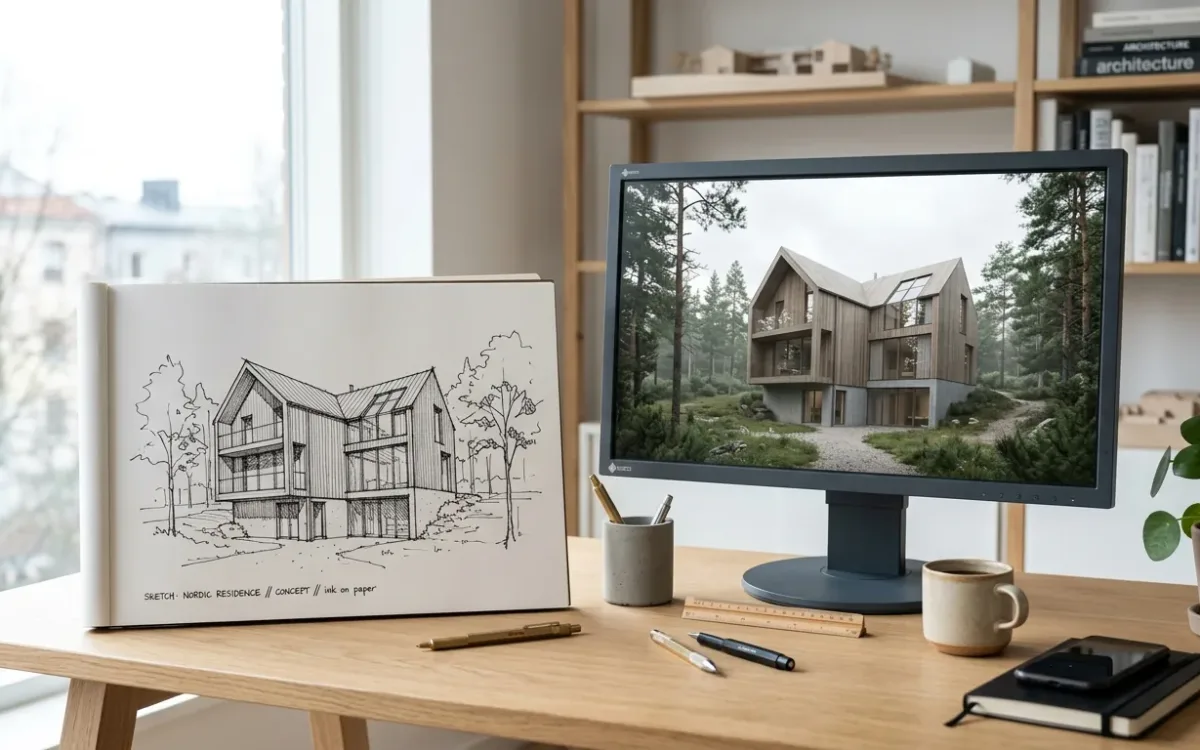
I spent 2 weeks testing nano banana architecture workflows with Nano Banana Pro. The job was to keep the camera and building fixed while changing light and materials. I got partial control of the camera. It never once held a bird's-eye view. The most useful changes came from the image settings, after 2 weeks of trying to solve the problem with prompt wording.
Nano Banana architecture workflows: what offices already do
Offices already use this workflow: screenshot the SketchUp or Revit view, paste it into Gemini, ask for a photorealistic version. One studio wrote on Reddit: "since we've started using ai we dont use rendering". Another architect keeps it narrower: "I just tend to run it through Nano Banana to make the textures more realistic."
For a practicing architect, a render is a way to get a decision. A model trained on photography can make light and materials convincing without scene setup. If you want the conventional routes alongside it, I wrote them up for rendering in SketchUp and rendering in Revit.
Much of the advice for this workflow focuses on wording. Longer prompts, camera vocabulary, "do not change the geometry" in capitals. That was where I started too.
Where Nano Banana architecture renders fail: the building changes
The images looked good. The errors became clear when I put the output next to the screenshot and checked what was still there.
Architects who paid for AI tools describe it precisely. One, comparing outputs: "one removed an entrance and another placed furniture directly across the aisle." Another: "they are too expensive for what they do and with each variation, they make more and more mistakes."
Good lighting does not make up for a removed entrance. You still have to check the drawing, and the client may remember the image longer than the plan.
Design fidelity is the degree to which a rendered image preserves the building you actually designed, with the same camera, proportions, openings and counts, nothing invented and nothing removed.
Photorealism describes how convincing the image looks. Design fidelity asks whether it is still your building. Nano Banana is strong on the first. The second is where your checking time goes.
What I measured
I build SecondRender, an AI rendering tool for architects. These were my own tests, on screenshots from a 3D model viewer. The job was to render a given view without moving the camera.
For 2 weeks I tuned prompt wording to stop the model "correcting" the camera. It kept pulling close-ups back into whole-building shots. Then I compared the failing path against another path that held geometry well and found 2 differences in the settings.
Aspect ratio forces a recomposition
The failing path always asked for a 16:9 image. The screenshots were roughly square. Asking for a wide image from a square source meant asking the model to fill space outside the source frame. It also recomposed the shot.
Matching the output aspect ratio to the source gave me the tightest framing match of the entire effort. It was the biggest single fix, and I found it only after I stopped looking at the prompt.
Temperature is a variation dial
Sampling temperature controls how much the model varies its output. The failing path ran at the API default of 1.0. The path that worked ran lower, around 0.7. In my sweeps, lower temperature gave tighter framing every time.
Tighter framing still did not mean identical output. The same input does not guarantee the same output. Lowering temperature does not remove that variation.
The Gemini app does not show you this setting. Google AI Studio and the API do.
What neither one fixed
Camera elevation. A bird's-eye source came back as a conventional three-quarter view at every temperature and every aspect ratio I tried. My best guess: a flat-shaded model on a plain background gives the model no cue about camera height, so it falls back to the view it has seen most. I have not proven that.
Attaching a whole previous render created another problem. I put it next to the source to carry its look over, but the model copied that render's composition instead of the source's. Small crops of a material or a piece of context did not cause that in my tests.
What protects design fidelity in practice
These are the checks and settings I would use before spending more time on the prompt.
- Match the output aspect ratio to your screenshot. If the view is 4:3, ask for 4:3. If the tool only offers fixed ratios, crop the screenshot to one of them first, so you choose what gets cut.
- Lower the variation where the tool lets you. In AI Studio or the API, bring temperature down from 1.0. In the Gemini app you cannot, so expect more drift between runs and allow time to check it.
- Do not attach a whole previous render next to your source. If you want the same brick or the same sky, attach a crop of the brick or the sky. A full image carries its own camera, and the model may follow it.
- Give the view some depth cues. Turn on shadows, keep a ground plane and a horizon in the screenshot. This is a hypothesis from my aerial failures, so test it on your own views. I have not established that it fixes camera elevation.
- Count before it leaves the office. Entrances, window bays, storeys, mullions, balcony depths, roof edges. Put the output over the screenshot at 50% opacity and look at the edges. Then read every sign and house number, because text is where these models fail most visibly.
Start every variation from the original screenshot, never from the last output. Feeding an AI image back in as the new source compounds its mistakes. Check each result against the source before using it as the basis for another decision.
Step 5 takes time that you need to include in the job. One comment on Reddit states it plainly: "Anything you use AI for is another thing you have to check for obvious errors." Budget that time before you promise anyone an image.
What Nano Banana architecture rendering is good for
An architect on Reddit described a narrow use: "The renders are just to greenlight the mood and palette."
That fits what I would use it for: testing material direction, light or season in an early conversation. You are choosing between warm timber and pale brick, with the detailed design still open. The same goes for early sketch to render work, where the design is loose on purpose and an invented tree may not affect the decision.
I would not rely on a pasted screenshot alone for a set of views that must agree with each other, planning or marketing images where an opening count is a commitment, or anything the client will later hold against the built result. Carrying one design, detail for detail, from one perspective into a second one is still the hardest problem in this whole category. That is true of every AI image model and every tool built on one, mine included.
High-end visualization requires specialist work. If you need a flagship image, that is still a job for a visualization artist. For many architects, the pasted screenshot serves a job that would otherwise have no image at all. The guide to architectural rendering covers where each route fits.
For more on how these workflows fit into practice, see AI in architecture.
SecondRender works on the visualization layer only: your model stays in the software you already use, and a screenshot is the input. The limits in this article apply to it too, and design fidelity is the measure I hold it to.
Questions architects ask about Nano Banana
Which AI model is best for architecture?
For mood and materials, Nano Banana Pro is strong. Holding the camera gave me a different result: a newer model, GPT Image 2.5, held camera height, angle and framing in 9 of 9 tries on the same hard views, including the aerial that Nano Banana never held. That is 9 images on one person's test set. It is not enough to name a best model for architecture. Treat it as a lead and run your own 3 hardest views through both.
Can you give me an architectural prompt for Gemini?
Yes, and keep it short: "Render this exact view photorealistically. Keep the camera, framing, proportions and every opening exactly as in the image. Change only materials, light and surroundings: [your materials], [time of day], [season and context]." Then set the output aspect ratio to match your screenshot, because that did more in my tests than any wording. The prompt tells the model what you want. It does not force it to comply.
Can nano bananas make a 3D model?
No. Nano Banana produces images, with no geometry, no dimensions and nothing you can open in SketchUp or Revit. It can draw a picture that looks like a 3D model, or several views of one object, but those views are separate images and they are not guaranteed to agree with each other. A different class of AI tool generates meshes from images, and those are not built to architectural tolerances either.